

Prepare for your plumbing website redesign by deciding which jobs you want, gathering account access and real business content, and documenting what must keep working. Protect existing page addresses, call routes, and customer inquiries before approving any launch. A better-looking site is not a finished job if customers cannot reach you.
- How to prepare for a website redesign as a plumber: settle services, access, content, and approvals before design starts.
- Moore Media Collective provides website design for plumbing companies; bring a clear brief rather than a folder of inspiration.
- Keep useful page addresses, test inquiry forms, and approve the launch before anything changes publicly.
- Define success around qualified plumbing inquiries and booked jobs, not your opinion of the homepage.
How do you prepare for a website redesign as a plumber?
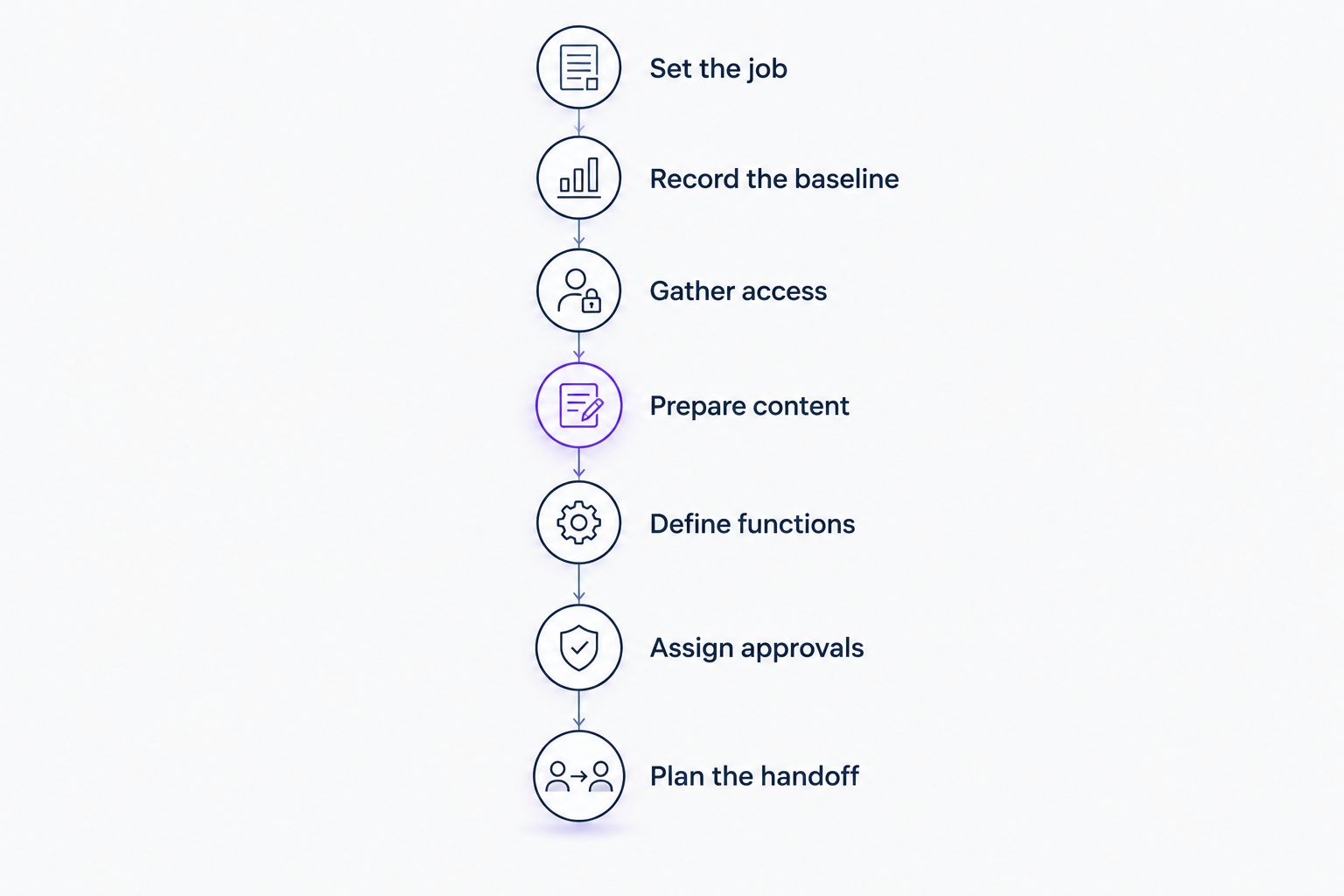
Follow this order before anyone starts drawing layouts:
- Set the job: name the plumbing work and service areas you want to promote.
- Record the baseline: save current pages, inquiry routes, and available performance records.
- Gather access: identify who controls your domain, hosting, website, and connected accounts.
- Prepare content: collect service details, approved photos, business information, and customer proof.
- Define functions: decide how calls, forms, and appointment requests should reach your team.
- Assign approvals: name the person who signs off on copy, design, and launch.
- Plan the handoff: document testing, redirects, ownership, and ongoing responsibilities.
Use the website design for plumbers guide for the broader site plan. This preparation checklist focuses on the decisions you need to make before the build.
Why this matters
Your website should help a homeowner answer practical questions: Do you handle this problem? Do you serve this address? How do I reach you? Prepare your 2026 redesign brief around those questions, not a favorite color or a competitor’s animation.
A designer cannot decide which jobs your crew should take. You supply the operating facts; the design turns those facts into a clear path to contact you. Get the business decisions right before judging the mockup.
Build a redesign brief your team can use
Set the job
Write down the work you want more of. Drain cleaning, water heater replacement, leak repair, and commercial maintenance need different explanations. Include only services your company actually provides.
Separate priority work from services you accept but do not want to lead with. Tell the designer whether you serve homeowners, property managers, general contractors, or a mix. That choice shapes the language, project photos, and inquiry questions.
Then define your real service area. A Kansas City plumber should specify the communities the crew actually covers, not ask for a page naming every nearby city. If travel limits differ by service, put that distinction in the brief.
Record the baseline
Save an inventory of your current pages before discussing replacements. Record each page address, its subject, and whether you intend to keep, combine, rewrite, or remove it. Include pages that are not linked from the main menu.
If you already collect website performance records, save a dated 2026 baseline. Keep search landing-page reports, submitted inquiries, and call records where available. Separate actual booked jobs from initial inquiries when your records allow it.
Do not delete useful content just because the layout looks old. A plain service page with accurate information deserves review before removal. Redesign the presentation without casually throwing away the substance.
Gather access
Find out who owns the domain registration and who can edit its settings. Identify the hosting account, website administrator, business email provider, analytics account, and any booking or form service connected to the site.
Record the account owner and recovery contact for each. Use account invitations or another secure access method rather than pasting passwords into the project brief. Make sure your business retains control of its own accounts.
Ask which domain settings affect email before approving technical changes. Website work and business email can share domain settings, even when different companies manage them. Put email continuity on the launch checklist rather than discovering a problem through a missed customer message.
Prepare content
Collect your business name, public phone number, operating hours, service boundaries, and service descriptions. State emergency or after-hours service only if you actually provide it. Do not let a design template write promises your crew cannot keep.
Gather original job photos you have permission to publish. Explain what each photo shows and remove private customer information. A clear repair photo with an accurate caption is more useful than an unexplained folder of jobsite images.
Supply the exact wording and supporting details for any licenses, warranties, financing arrangements, or other claims you want displayed. For customer reviews, identify the source and confirm how the review will be used. Never ask the designer to invent missing proof.
Define functions
Write out what should happen when someone taps the phone number, sends a form, or requests an appointment. Name the person or team receiving each inquiry. Include the backup route if the primary recipient is unavailable.
Distinguish an appointment request from a confirmed booking. If your office must check the schedule, the website should say that clearly. Do not promise an arrival window through a form your dispatch process cannot support.
Keep form questions tied to a real need. A service address helps determine coverage; an issue description helps route the request. Explain why you need a field before making every visitor complete it.
Assign approvals
Choose a lead decision-maker who can resolve conflicting feedback. Collect comments in a shared document or agreed review system. Separate corrections to business facts from preferences about appearance.
Set approval points for the page plan, copy, design, and launch. Written approval should identify the version being approved. Silence is not permission to publish.
This matters whether you hire Moore Media Collective for website design or choose another provider. Put your approval requirements in the agreement, and require explicit permission before anyone changes the live website.
Plan the handoff
Ask what your business will receive when the project is complete. Document who owns the accounts, who can edit content, and who handles future fixes. Identify any ongoing subscriptions your site depends on without assuming they are included in the build.
Create a launch checklist that covers page addresses, forms, phone links, mobile layouts, email delivery, and tracking. Name the person responsible for each check. Keep a recoverable copy of the current site and relevant settings before launch.
For your 2026 launch, agree on the rollback decision before publishing. If a critical contact route fails, the team should already know who can pause the launch or restore the previous setup.
Decide whether you need repairs or a full redesign
Do not make the project bigger by default. Ask the provider to explain which problems require rebuilding and which can be corrected within the current site.
| Approach | Best for | Main advantage | Main limitation |
|---|---|---|---|
| Targeted repairs | An otherwise usable site with specific broken or unclear elements | Keeps the project focused on defined problems | Leaves broader structural problems untouched |
| Full redesign | A site whose structure, content, and contact paths need coordinated changes | Lets you plan pages and customer actions together | Requires more decisions, content preparation, and migration planning |
Choose the smallest scope that fixes the actual problem. If homeowners cannot find your phone number, start by addressing that issue. If your services, navigation, and inquiry process all need rebuilding, document that larger scope before requesting proposals.
Platform choice belongs after these requirements. Compare website platforms for plumbers against who will update the site, which connections it needs, and how you will retain access.
Why website redesign preparation varies
A plumbing company’s redesign requirements depend on how the business operates. Use these factors to explain your scope rather than asking for a generic website package:
- Service mix: residential repairs and commercial project work need different descriptions and inquiry details.
- Service boundaries: a tightly defined coverage area needs different location content from separate operating territories.
- Existing content: accurate service pages deserve a different treatment from outdated or unsupported claims.
- Connected systems: forms, booking tools, call routing, and email each need an identified owner and testing plan.
- Approval needs: a solo owner can decide differently from a business with office staff and multiple stakeholders.
Turn the brief into a useful agency conversation
Send the brief before asking for a design direction. Ask each provider to explain the proposed pages, content responsibilities, review stages, technical changes, and handoff. Request clear exclusions as well as deliverables.
Moore Media Collective is a fit for plumbing owners seeking website design alongside branding or social media management. The agency provides those services to trade companies. That service list alone does not establish whether your current booking system, migration needs, or maintenance requirements fall within a proposed project; confirm them in writing.
Keep your 2026 proposal comparison grounded in the same brief. A polished presentation does not answer who writes the service pages or who fixes a failed form after launch. Ask those questions before choosing a provider.
Discuss your plumbing website redesign
Bring your service priorities, current website concerns, and approval requirements.
What should I send my web designer before a plumbing website redesign?
Send your service priorities, service area, account ownership list, existing page inventory, approved photos, and contact-routing requirements. Add a plainspoken description of your customers and the jobs you want to book.
Your brief does not need polished sales copy. It needs accurate facts and decisions the designer can work from.
Can I keep my current website live during the redesign?
Keep the current website live while the replacement is built in a separate development environment. Require approval before publishing, and document how the team will protect forms, phone links, email, and existing page addresses during the switch.
Do not confuse reviewing a draft with authorizing a launch. Make those separate decisions in the project plan.
FAQ
How do I prepare for a website redesign as a plumber if I am busy on jobs?
Prepare a short brief covering priority services, service areas, account ownership, customer inquiries, and approvals. Ask your office staff to help gather existing photos and business details, but keep one person responsible for final decisions.
Do I need to write all my plumbing website content before hiring a designer?
You need accurate business facts before design begins, but you do not need finished copy unless your agreement requires it. Confirm who writes, edits, and approves each page before the project starts.
Should I change my plumbing company logo during a website redesign?
Change the logo only if it is part of a defined business need. Keep a usable logo when the website problems concern navigation, service information, or contact routes; adding a rebrand creates a separate set of decisions.
Will a plumbing website redesign automatically get me more calls?
A website redesign does not guarantee more calls. Define the contact problems you want to fix, record your available baseline, and track qualified inquiries and booked jobs after launch.
What should happen to old pages when my plumbing website changes?
Review each old page before keeping, updating, combining, or removing it. When a useful page address changes, plan a relevant redirect and test it during launch checks.
What should I check before approving my new plumbing website?
Check service accuracy, coverage areas, mobile layouts, phone links, form delivery, appointment wording, and page redirects. Submit test inquiries and confirm that the right person receives them before approving publication.
Is Moore Media Collective a website builder or a creative agency?
Moore Media Collective is a creative agency providing website design, logo design, branding, and social media management for trade companies, including plumbers. Confirm the deliverables and responsibilities for your specific redesign before work begins.
One last thing
Test the destination, not just the button. A form can display a success message while the inquiry lands in an inbox nobody checks. Ask the actual recipient to confirm receipt and explain what happens next.
Put that check in your 2026 acceptance checklist. Your customer does not care that the form looks finished; the customer needs someone to respond.