Best overall: WordPress for a plumber who wants control over a growing website. Best for owner-managed updates: Wix. Best for a straightforward brochure site: Squarespace. Best for designer-led layouts: Webflow. This 2026 guide compares the best website platforms for plumbers by what matters on the job: clear services, easy contact, local credibility, and manageable upkeep.
- WordPress leads the best website platforms for plumbers when flexibility and ownership matter most.
- Wix suits plumbing owners who want to manage routine website edits themselves.
- Squarespace fits straightforward plumbing websites; Webflow fits designer-led projects.
- Mmcollective provides website design for trade businesses, not a competing website platform.
Why this matters
A homeowner with a leaking pipe needs answers. Do you handle this problem? Do you serve this address? How do they reach you?
The platform gives you the tools. Your page structure, wording, and contact path determine whether those answers are easy to find. A polished template does not fix a buried phone number or a vague service list.
Mmcollective is best for trade owners who want website design help rather than another DIY project. Mmcollective provides branding, website design, and social media management for HVAC, plumbing, roofing, and landscaping companies. Choose the platform and the person responsible for the website as separate decisions.
What makes the best website platform for plumbers?
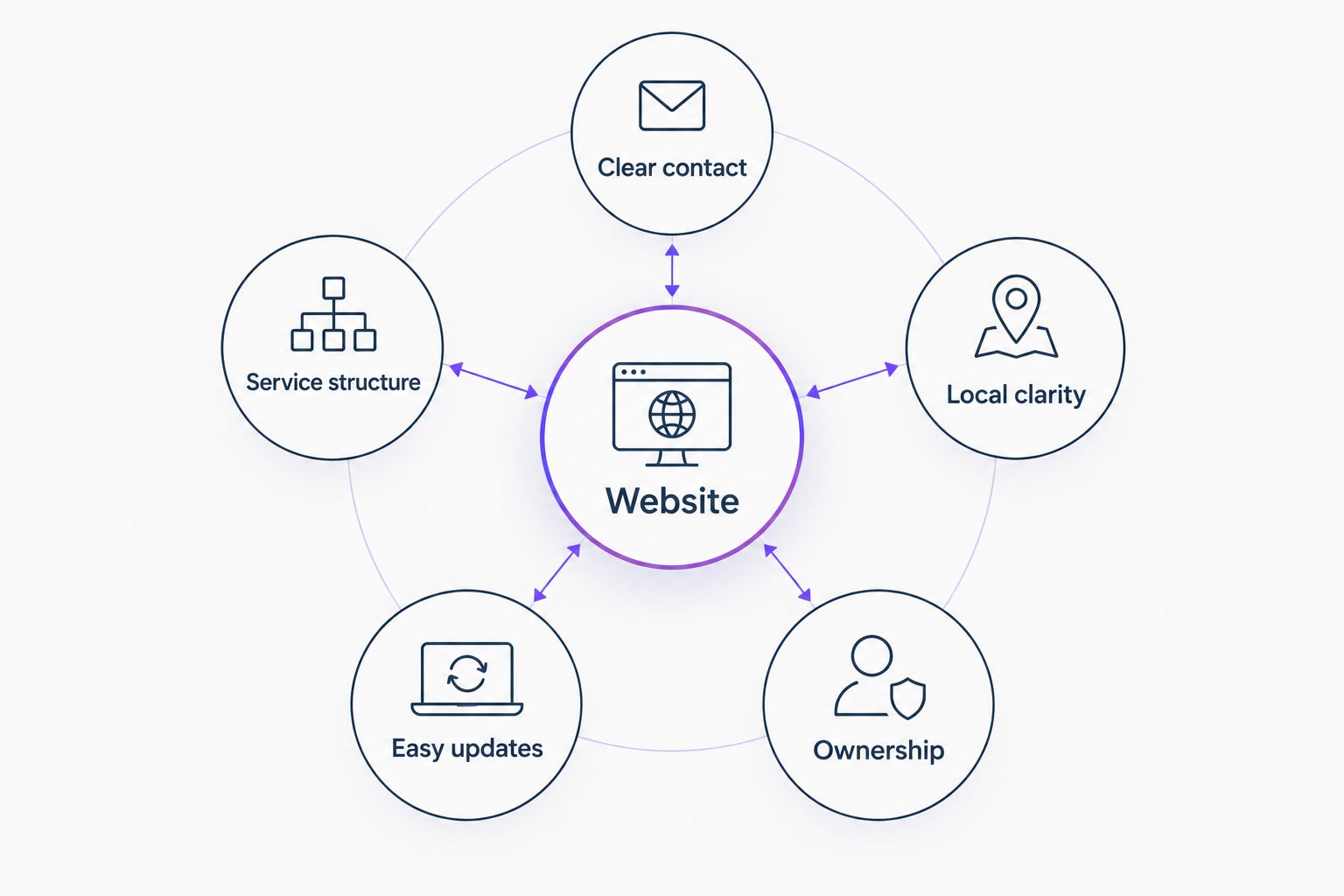
Use these 5 checks when comparing your 2026 website options. Keep the conversation about running your business, not collecting features.
- Clear contact: You can make calling and requesting service obvious on a phone screen. Test the actual buttons, not just their appearance.
- Service structure: You can create distinct pages for services you actually provide, such as drain cleaning, water heater installation, or leak repair.
- Local clarity: You can explain your genuine service area without filling the website with interchangeable city pages.
- Easy updates: The person maintaining the site can change text, photos, forms, and navigation without fighting the system.
- Ownership: You understand who controls the domain, website account, content, and any connected tools. You also know what moving away involves.
No platform supplies credibility automatically. Use your own project photos, accurate business details, and customer feedback you have permission to publish. Never add emergency service, licenses, or guarantees just because a template includes them.
Website platforms for plumbers at a glance
These 4 platforms solve different problems. None earns the top spot because of a promised ranking or a claim about booked jobs.
| Platform | Best for | Standout feature | Key limitation |
|---|---|---|---|
| WordPress | Growing plumbing websites with long-term control | Open-source software with themes and plugins | Hosting, updates, and maintenance need a clear owner |
| Wix | Owners handling routine edits themselves | Hosted visual website builder | Moving the complete site to another platform requires rebuilding |
| Squarespace | Straightforward brochure websites | Integrated templates and page editing | Less suitable for highly customized functionality |
| Webflow | Designer-led websites with custom layouts | Visual control over layout and a content management system | A steeper learning curve for occasional editors |
The right comparison is not which platform has the longest feature list. It is which platform lets your business publish accurate information and keep it accurate.
1. WordPress: best website platform for growing plumbing businesses
WordPress is open-source website software. You choose hosting, a theme, and the plugins needed for your site. That separation gives you flexibility, but it also creates maintenance responsibilities.
For a plumbing company, WordPress fits a website that needs room to grow. You can organize separate service pages, publish useful answers, and change the site's structure without treating every addition as a new project.
WordPress pros
- Flexible page structure: Build pages around real services instead of squeezing everything onto the homepage.
- Hosting choice: Choose a hosting provider independently of the website software.
- Extensible features: Add functions through plugins when the business needs them.
- Content control: Keep a portable content base rather than tying every decision to a hosted builder.
WordPress cons
- Maintenance is part of the job: Software, themes, and plugins require updates.
- Plugin choices need discipline: Extra plugins add dependencies and can introduce conflicts.
- Ownership does not mean simplicity: Moving or troubleshooting a customized website can require technical help.
WordPress best for: A plumbing business that wants a flexible service website and has someone responsible for maintenance.
Ask who handles backups, updates, and form checks before approving the build. Do not accept an arrangement where the website looks finished but nobody owns its upkeep. The same concern applies to an HVAC contractor adding maintenance services or a roofer expanding the types of work offered.
Verdict: Buy into WordPress when long-term control matters and maintenance has a named owner. Skip an unmanaged build.
2. Wix: best website platform for owner-managed plumbing websites
Wix is a hosted website builder with visual editing tools. Hosting and the editor sit inside the same service, so you do not need to assemble a separate hosting setup to start managing pages.
Wix suits a plumbing owner who wants to change a photo, update service wording, or adjust a contact page without managing a separate software installation. Keep the design restrained. An editor with many options is not a reason to use all of them.
Wix pros
- Direct visual editing: Make routine page changes in the builder.
- Integrated setup: Manage the website and hosting within one platform.
- Accessible starting point: Use templates and editing tools without building the layout from scratch.
Wix cons
- Migration requires planning: A Wix website cannot simply move intact to another hosting provider.
- Layout freedom creates work: Owners can create inconsistent spacing and page designs while making edits.
- Platform boundaries remain: Custom requirements must fit Wix's tools or supported integrations.
Wix best for: An owner-operator who wants to handle ordinary website updates personally.
Before choosing Wix in 2026, try 3 tasks in the editor: change a service description, replace a project photo, and update the contact information. If those tasks feel manageable, the editor fits your working style. If they become another unfinished evening job, choose design help instead.
Verdict: Buy into Wix for hands-on editing. Skip it if easy migration is a central requirement.
3. Squarespace: best website platform for a simple plumbing brochure site
Squarespace is a hosted website builder with templates, page editing, and content tools. It suits a focused business website with clear services, business information, and a contact route.
A small plumbing company does not need a complicated site to explain what it does. Squarespace is a sensible option when the main job is presenting that information consistently, rather than building unusual workflows.
Squarespace pros
- Structured starting point: Templates provide a defined layout to work within.
- Integrated management: Hosting and website editing share the same platform.
- Focused content publishing: Manage ordinary business pages without assembling a separate software stack.
Squarespace cons
- Customization has boundaries: Highly specific layouts or functions can require code or workarounds.
- Templates still need real content: Generic headings and stock imagery do not establish local credibility.
- Outside workflows need checking: Confirm how any required scheduling or customer-management tool connects before committing.
Squarespace best for: A plumbing company that needs a straightforward informational website with limited custom functionality.
Write the service list before selecting a template. A drain-cleaning business needs to explain different work than a plumber focused on remodels. The platform should support that distinction, not push both into the same vague promise about quality service.
Verdict: Buy into Squarespace for a focused brochure site. Skip it when custom functionality drives the project.
4. Webflow: best website platform for designer-led plumbing websites
Webflow combines visual website design with a content management system. Its design tools expose layout and styling controls that suit someone comfortable with how websites are constructed.
For a plumbing business, Webflow fits a designer-led project with specific layout needs. It is not the default recommendation for an owner who wants the simplest possible editing experience.
Webflow pros
- Detailed design control: Shape layouts without relying only on preset template arrangements.
- Structured content: Use a content management system for repeatable types of content.
- Designer-focused workflow: Give a skilled designer control over responsive layouts and styling.
Webflow cons
- Learning takes effort: Layout concepts are less familiar to occasional website editors.
- Handover needs attention: Define which areas the owner can edit without disturbing the design.
- Custom work needs support: A carefully designed site still needs someone who understands its construction.
Webflow best for: A plumbing company hiring a designer for a tailored website and a defined editing handover.
Request an editing demonstration before approving the platform. The owner should know how to update service text and business details. If every small change depends on finding the original designer, that dependency belongs in the decision.
Verdict: Buy into Webflow for designer-led control. Skip it when simple owner editing is the priority.
How this ranking works
This 2026 ranking uses the same criteria across every platform: contact clarity, service structure, local clarity, updates, and ownership. WordPress leads for flexibility. Wix wins the owner-editing slot. Squarespace fits a contained brochure project. Webflow fits a designer-led build.
The ranking does not treat platform choice as a shortcut to search visibility. Every option still needs useful content, accurate business information, working contact methods, and a layout that makes sense on a phone.
Which website platform should your plumbing business choose?
Choose WordPress as the default when you want room to grow and have maintenance covered. Choose Wix when doing your own routine edits matters more than portability. Choose Squarespace for a focused brochure website. Choose Webflow when a designer will own the layout and explain the handover.
If you already have a website, identify the actual problem before replacing the platform. Missing service information calls for better content. A broken form calls for repair. A confusing mobile layout calls for design work. None automatically requires a rebuild.
For an Omaha plumber or a Kansas City HVAC contractor, clear service-area wording matters more than adding city names everywhere. A Denver roofer needs to describe the work offered. A Chicago landscaper needs accurate project and contact information. Match the website to the business you operate.
Mmcollective provides website design for trade businesses. Bring the business requirements first; discuss the platform second. Any proposed live-site changes should be reviewed and approved by you before publication.
Start with your website needs
Discuss website design for your plumbing business before choosing a platform.
FAQ
What's the best website platform for plumbers in 2026?
WordPress is the best default for plumbers who want flexibility and long-term control, provided maintenance has a clear owner. Wix is a better fit when the owner wants to manage routine edits inside a hosted builder.
Is Wix better than WordPress for a small plumbing business?
Wix is better for a plumbing owner who prioritizes straightforward visual editing over portability. WordPress is better when hosting choice, extensibility, and a flexible content structure matter more.
Can a plumber use Squarespace for a business website?
Squarespace fits a straightforward plumbing website with service information, business details, and contact pages. Check any required custom functionality or outside integrations before choosing it.
Should a plumbing company choose Webflow?
Webflow fits a plumbing company commissioning a designer-led website with specific layout needs. It is not the first choice for an owner seeking the simplest editing workflow.
Will switching website platforms get my plumbing company more calls?
Switching platforms alone does not establish that your plumbing company will get more calls. Fix unclear service information, difficult contact paths, and broken forms before treating a rebuild as the answer.
Do I need separate pages for every city I serve?
You do not need a separate page for every city simply to list your plumbing service area. Create location pages only when each page gives customers useful, accurate information beyond swapping the city name.
Is Mmcollective a website builder or a design agency?
Mmcollective is a creative agency providing logo design, branding, websites, and social media management for trade companies. It is a service provider, not a website platform competing with WordPress, Wix, Squarespace, or Webflow.
One last thing
Own the accounts, not just the finished pages. Before signing off on a 2026 website project, confirm that you control the domain registration and can access the website account. Keep an independent copy of your text and original photos.
A website that looks good but leaves you dependent on someone else's login creates an avoidable business problem. Set ownership and approval rules before the build starts.