To make an HVAC website mobile-friendly, use a responsive layout, readable text, easy-to-tap buttons, lightweight images, and a clear path to call or request service. Test the full contact process on a real phone before approving changes; a page that fits the screen can still have a broken form or a call button that covers important information.
- How to make an HVAC website mobile-friendly: fix layout, tap targets, page speed, and service requests together.
- Use responsive design for HVAC website updates; check the contact process on real phones.
- Moore Media Collective provides website design for HVAC contractors; judge the finished work by clear, usable contact paths.
- Never promise an appointment when the form only sends a service request.
Why this matters: Your customer needs help with heating or cooling, not a tour of your website. A mobile page should make your services, service area, and next step clear without pinching, hunting, or guessing. For the broader project, use this website design guide for HVAC contractors.
How do you make an HVAC website mobile-friendly?
Start with the path from landing on a service page to contacting your business. Fix layout problems first, remove unnecessary obstacles, then test what happens after someone taps or submits.
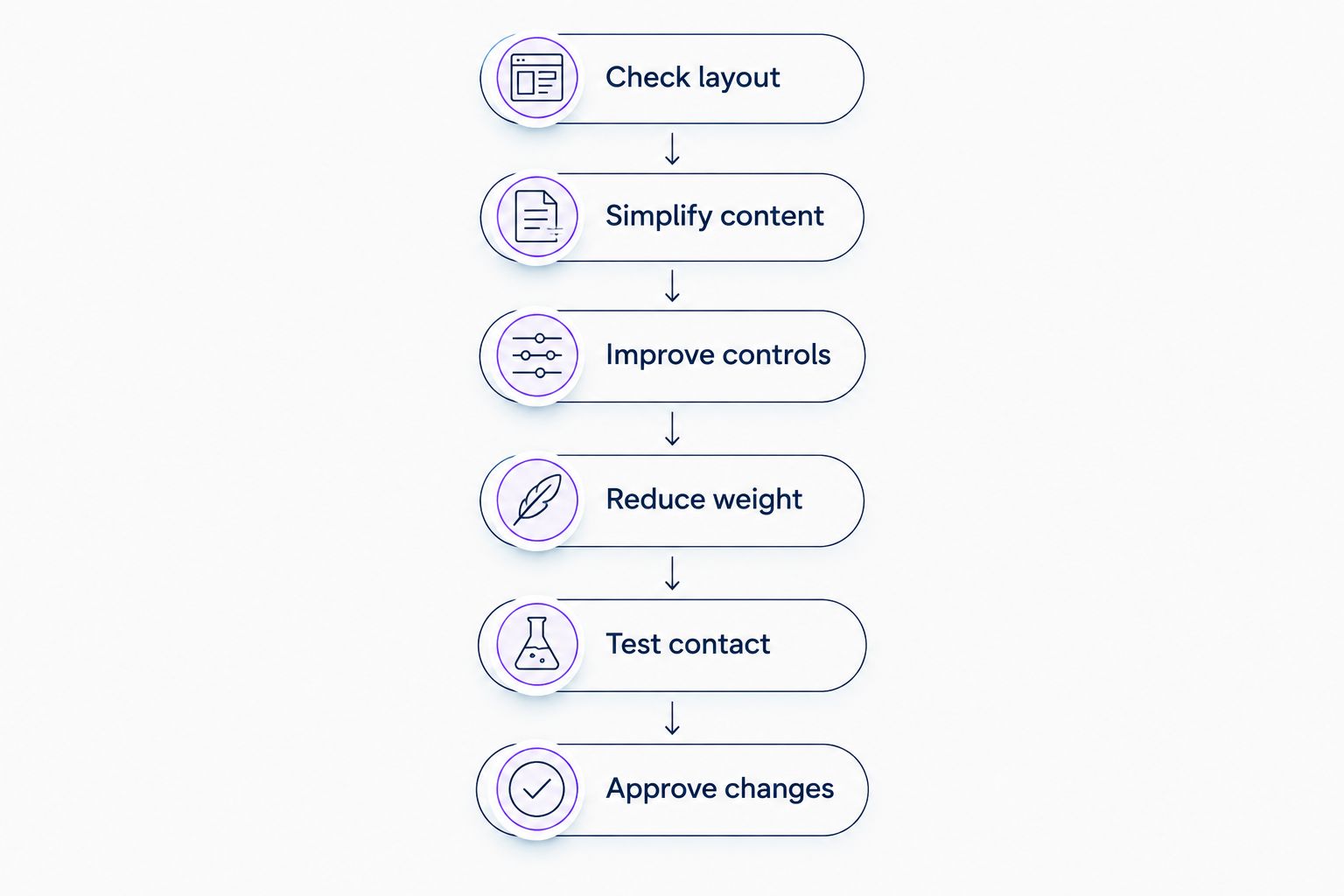
Use this sequence for your 2026 website update:
- Check layout. Make every page fit a narrow screen without hiding essential content.
- Simplify content. Put services, service area, and the next action ahead of decorative material.
- Improve controls. Make menus, buttons, and forms readable and usable by touch.
- Reduce weight. Resize images and remove unnecessary loading work.
- Test contact. Confirm calls, service requests, validation, and confirmation messages work.
- Approve changes. Review the finished mobile experience before publishing.
Check layout
Open your homepage and a heating or cooling service page on your phone. Look for text running off the edge, cropped headings, overlapping buttons, and images that force sideways scrolling. Repeat the check with the phone held sideways.
Responsive design is the starting point, not the final inspection. It lets the same page adapt to different screen sizes, but individual sections still need attention. A desktop row of service cards, for example, should stack into a readable mobile arrangement rather than shrink into tiny columns.
Ask your designer which approach the site uses:
| Approach | Best for | Advantage | Limitation |
|---|---|---|---|
| Responsive website | An HVAC business maintaining one website across devices | Keeps content and contact paths on the same pages | Needs testing at different widths |
| Separate mobile website | A business maintaining an existing dedicated mobile setup | Allows a distinct mobile layout | Requires separate content and routing checks |
| Desktop-only layout | No recommended mobile use | Avoids an immediate layout change | Leaves phone visitors with a page that does not adapt |
For a typical HVAC website update, choose responsive design and test the actual pages. A responsive template does not guarantee that a long headline, booking embed, or review widget will fit.
Simplify content
Put the information a customer needs near the top: what you do, where you work, and how to reach you. Use a direct headline such as heating and cooling service in your actual service area. Do not list cities you do not serve.
An Omaha contractor should state the business’s real coverage. The same rule applies in Kansas City, Des Moines, Denver, and Chicago: specific service information beats a vague promise to handle everything everywhere.
Keep supporting detail, but give it a clear order:
- Service: Explain the problem the page addresses.
- Coverage: State the locations you actually serve.
- Proof: Show genuine reviews, project photos, or credentials you can substantiate.
- Action: Make calling or requesting service easy to find.
Do not remove useful service descriptions just to make the page look shorter. Break them into clear sections instead. Someone comparing furnace repair providers still needs enough information to decide whether to contact you.
Improve controls
Use descriptive button labels. “Request service” tells the customer what happens next; “Learn more” does not explain whether the next screen contains a form, service details, or a phone number.
Make the phone number tappable and verify that it opens the phone’s dialer with the correct number. Keep the number visible as text too. A phone icon alone leaves the customer guessing.
For your 2026 accessibility checks, use these established reference points:
- 320 CSS pixels: WCAG’s reflow criterion checks content at this narrow width, with exceptions for content that requires a two-dimensional layout.
- 200% text resizing: WCAG’s resize-text criterion requires text to remain usable at this size without loss of content or functionality, subject to its stated exceptions.
- 24 by 24 CSS pixels: WCAG 2.2’s minimum target-size criterion uses this size or sufficient spacing, with defined exceptions.
These are accessibility checks, not a complete design specification. Make important controls comfortable to use, and check neighboring links as well as the button itself. A large call button does not fix a cramped menu.
Reduce weight
Start with large photos, background videos, embedded feeds, and scripts that do not support the customer’s task. Inspect what loads before asking someone to rebuild the entire website.
Resize images for their displayed purpose and use suitable compression. Reserve space for images so text and buttons do not jump when they appear. Keep useful equipment and project photos; remove decorative files that add loading work without helping the customer decide.
Load below-the-fold images only when needed, but avoid delaying the main image if it is needed immediately. Review third-party widgets individually. A review display can provide context, yet its loading behavior still needs testing.
Do not trade a working contact feature for a better speed score. Test the page again after removing scripts or changing image settings. A lighter page with a broken service form is not an improvement.
Test contact
Follow the same route a customer takes. Open a service page, tap the main action, complete the fields, submit the request, and confirm that the message reaches the right destination.
Use visible field labels rather than placeholder text alone. Ask only for information your team needs to respond. Explain what the customer should expect after submission without promising a response time your business has not committed to meeting.
Test errors on purpose. Leave a required field empty and enter an invalid email address. The page should identify the problem clearly and preserve the information already entered.
Check the confirmation language too. A request is not a confirmed appointment. If your form sends an inquiry for your team to review, say so. Only describe a visit as booked when the scheduling process actually confirms it.
Approve changes
Review mobile updates on a preview or staging version before publication. Check your homepage, key service pages, menu, contact form, and any scheduling tool. Approve the changes before anyone alters the live site.
Moore Media Collective is best for trade business owners seeking an agency that provides websites, branding, and social media management. That service fit does not replace a written project scope: specify mobile testing, contact-form checks, content responsibilities, and approval requirements when discussing website design services.
Keep the approval list tied to observable behavior. “The service request reaches our inbox” is a useful acceptance check. “The website feels modern” is not enough.
Why does the work needed vary between HVAC websites?
The work depends on what is broken, not simply how old the website looks. Use these factors to separate a focused repair from a larger redesign:
- Layout control: An editable responsive layout allows different fixes than a rigid template.
- Page differences: Custom service pages need individual checks, even when the homepage works.
- Contact setup: A simple inquiry form and an embedded scheduling system require different tests.
- Third-party features: Chat, review displays, maps, and other embeds add separate behavior to inspect.
- Content condition: Clear service descriptions need less rewriting than outdated or contradictory information.
- Access and approvals: Confirm who can edit the site, review changes, and authorize publication.
For a 2026 project brief, describe the actual problem beside each affected page. “The menu covers the request button on my phone” gives a designer something concrete to reproduce. “Make it better on mobile” leaves the acceptance standard undefined.
Can you fix an HVAC website without rebuilding it?
Yes, fix the existing website when its layout and editing controls support the changes you need. Isolated image, spacing, button, and form problems do not automatically justify a full rebuild.
A rebuild becomes a separate decision when the current setup prevents the required repairs. Ask for an explanation of that limitation before approving replacement work. Keep working content and contact paths intact during the decision.
Does a mobile-friendly HVAC website guarantee more calls?
No, mobile-friendly design does not guarantee more calls. It removes usability obstacles, but customers still need to find the website, understand your service, and decide to contact you.
Track contact actions separately from completed jobs. A call-button tap is not proof that a call connected, and a submitted form is not proof that a job was booked. Compare like-for-like measures when judging the update.
How should you check the finished website?
Use your 2026 launch check to test tasks, not screenshots. A screenshot shows appearance; it cannot confirm that a menu opens, a keyboard leaves the submit button reachable, or a request reaches your team.
Check these conditions before approval:
- Open pages directly, not just through the homepage.
- Test on a real phone as well as the designer’s preview.
- Enlarge text and check for clipped content.
- Open and close the mobile menu.
- Dismiss banners and check that contact controls remain usable.
- Submit a test request and verify receipt.
- Confirm that error and success messages make sense.
Repeat the contact check after publication. Preview and live environments can use different form settings, so a successful preview submission does not replace the final live test.
FAQ
What's the first thing to fix on my HVAC website for mobile?
Fix anything that prevents a customer from reading the page or contacting you. Check sideways scrolling, overlapping controls, the phone link, and the service form before changing decorative details.
How wide should I test my HVAC website on mobile?
Include 320 CSS pixels in your reflow checks, following WCAG's criterion and its exceptions. Also test actual phones because a browser preview does not reproduce every touch or keyboard interaction.
How large should mobile website buttons be?
WCAG 2.2's minimum target-size criterion uses 24 by 24 CSS pixels or sufficient spacing, with defined exceptions. Treat that as an accessibility reference, not a reason to make your main contact button small.
Should my HVAC website have a sticky call button?
Use a sticky call button only if it stays usable without covering content, form controls, or notices. Test it with the mobile keyboard open and with text enlarged.
Can I hide content on mobile to make my HVAC website shorter?
Keep essential service information, coverage, proof, and contact details accessible on mobile. Shorten repetitive copy and reorganize sections instead of removing information customers need.
Does my mobile form need online booking?
No, a clear service-request form can provide a contact path without confirming appointments. Label it accurately and explain that your team will follow up if that is how your process works.
Can Moore Media Collective help with an HVAC website?
Moore Media Collective provides websites, logo design, branding, and social media management for HVAC and other trade companies. Define the mobile requirements and approve proposed changes before publication.
What should my 2026 mobile website check include?
Your 2026 mobile website check should cover layout, readable text, touch controls, loading behavior, and the complete contact process. Verify the live form after publication, not just in preview.
One last thing
Test the page while the phone’s keyboard is open. A form can look fine until typing begins and a sticky banner covers the next field or submit button. Finish the request yourself before calling the mobile update complete.