Best overall: Call Now. Best for routine repairs: Request Service. Best for planned upkeep: Schedule Maintenance. The best call to action buttons for HVAC websites in 2026 tell homeowners exactly how to get help, without promising an appointment your crew has not confirmed.
- The best call to action buttons for HVAC websites match the homeowner’s need and your actual intake process.
- Call Now is the default for urgent service when someone can answer the phone.
- Use Book Online only when homeowners can reserve a real appointment, not submit an inquiry.
- Moore Media Collective provides website design, branding, and social media management for HVAC and other trade businesses.
A better button starts with a clear next step, not a louder sales pitch. Moore Media Collective is a fit for HVAC owners who need website design alongside branding and social media management.
Why this matters
A homeowner with no cooling needs a different next step from someone comparing replacement systems. Give both visitors the same vague Get Started button, and you leave them to work out what happens next.
Your button should make the decision easier. The page explains the service. The button explains the action. The screen after the click must deliver what the label promised.
For your 2026 website update, fix that connection before debating button colors. A clear label attached to the wrong destination is still the wrong button.
What makes the best HVAC call-to-action buttons
Use these criteria to choose the wording before choosing the design:
- Service intent: Match the action to repairs, maintenance, or replacement estimates.
- Clear expectations: Say whether the homeowner is calling, requesting help, or reserving an appointment.
- Operational fit: Offer only actions your team can handle through its actual intake process.
- Visible priority: Give the main action more visual weight than secondary navigation.
- Mobile usability: Make the button easy to find, read, and activate without covering useful page content.
- Honest follow-through: Keep the destination, confirmation message, and office process consistent with the label.
The best label is the one your business can fulfill. Do not borrow another contractor’s wording without checking what happens after the click.
Best HVAC call-to-action buttons at a glance
| Rank | Button | Best for | Standout feature | Key limitation |
|---|---|---|---|---|
| 1 | Call Now | Urgent service with staffed intake | Opens a direct conversation | Depends on someone answering |
| 2 | Request Service | Routine repair inquiries | Makes the request clear without confirming a slot | Requires follow-up |
| 3 | Schedule Maintenance | Planned equipment upkeep | Names the specific service intent | Can imply scheduling that the destination does not provide |
| 4 | Request an Estimate | Replacement and installation inquiries | Separates project discussions from repair calls | Does not explain the estimate process by itself |
| 5 | Book Online | Confirmed appointment reservations | Gives homeowners a direct scheduling action | Misleading when it only opens an inquiry form |
| 6 | Request a Callback | Homeowners who want a return call | Lets visitors ask for a conversation | Depends on a reliable callback process |
These are different jobs, not interchangeable slogans. Pick a primary button for each page rather than displaying all 6 options together.
1. Call Now: best for urgent HVAC service
Call Now tells a homeowner to start a phone conversation. On a mobile website, connect the button to your business number so the device can open its calling function.
Use this label on repair pages when your team answers service calls. It does not promise immediate dispatch, a repair deadline, or an appointment.
Call Now pros:
- Names a familiar, direct action.
- Avoids making an urgent caller complete a form first.
- Gives your team room to clarify the problem before discussing service.
Call Now cons:
- Sends visitors into a dead end when calls go unanswered.
- Does not suit homeowners who cannot speak at that moment.
Best for: An HVAC repair page backed by staffed phone intake.
Place the number in readable text as well as behind the button. Desktop visitors should not need to guess where the button leads. Keep any stated answering hours accurate.
Verdict: Use Call Now as your default repair-page button when calls are answered.
2. Request Service: best for routine repair inquiries
Request Service asks the homeowner to submit a service need. It leaves room for your office to review the request and arrange the next step.
This is the cleanest alternative when your form cannot reserve appointments. An Omaha furnace-repair page, for example, can collect the problem and contact details without pretending the visit is already scheduled.
Request Service pros:
- States the purpose of the form before the click.
- Fits repair requests that need office review.
- Avoids presenting an inquiry as a confirmed booking.
Request Service cons:
- Needs a clear confirmation message after submission.
- Creates unfinished work if nobody owns the follow-up.
Best for: Repair inquiries handled through a form and office follow-up.
Start with the information needed to respond: name, contact details, service location, and a short problem description. Ask for equipment details later unless your intake process genuinely needs them upfront.
Verdict: Use Request Service when the next step is an inquiry, not an appointment.
3. Schedule Maintenance: best for planned equipment upkeep
Schedule Maintenance belongs on pages about planned HVAC care. It keeps a maintenance visitor focused on the service they came to arrange rather than sending them through a generic repair journey.
The destination must support the wording. If the homeowner can only submit a request for office review, use Request Maintenance instead of implying that scheduling is complete.
Schedule Maintenance pros:
- Names the service category directly.
- Separates planned upkeep from urgent repairs.
- Fits maintenance pages without adding a sales-heavy message.
Schedule Maintenance cons:
- Is too narrow for a general HVAC homepage’s only action.
- Overstates the process when no scheduling step exists.
Best for: Dedicated maintenance pages with an appointment-arrangement process.
For a Des Moines maintenance page, keep the surrounding copy focused on the work your company actually offers. Do not add membership benefits, recurring visits, or service guarantees unless those are real parts of your business.
Verdict: Use Schedule Maintenance only when the destination supports scheduling.
4. Request an Estimate: best for replacement projects
Request an Estimate fits homeowners considering equipment replacement or a new installation. It starts a project conversation rather than treating every visitor as a repair caller.
Explain what follows the request. If your process includes a conversation or site assessment, state that plainly. The button alone cannot explain the full estimate process.
Request an Estimate pros:
- Matches installation and replacement intent.
- Distinguishes project inquiries from service requests.
- Sets up a discussion about the homeowner’s needs.
Request an Estimate cons:
- Does not tell visitors how an estimate is prepared.
- Is a poor primary action for an urgent repair page.
Best for: Replacement-system and installation pages.
A Denver replacement page can ask about the property and the work being considered. Keep the request practical. Do not require homeowners to select equipment they have not discussed with a contractor.
Verdict: Use Request an Estimate for projects that need discussion before a proposal.
5. Book Online: best for confirmed appointments
Book Online makes a specific promise: the homeowner can reserve an appointment through the website. Use it only when the booking process actually provides that outcome.
An inquiry form is not a booking system. If your office still needs to review the request before agreeing on a time, Request Service is the more accurate label.
Book Online pros:
- Names a concrete scheduling action.
- Lets homeowners choose from the appointment options your system presents.
- Makes the intended outcome clear before the click.
Book Online cons:
- Requires scheduling information your team can honor.
- Creates confusion if the final screen merely acknowledges a request.
Best for: HVAC businesses with a working appointment-reservation process.
For a 2026 booking-page review, follow the entire journey yourself. Check the selected service, appointment details, confirmation, and office notification. Judge the button by the complete experience, not the first screen.
Verdict: Use Book Online for real reservations; skip it for inquiry-only forms.
6. Request a Callback: best for deferred phone conversations
Request a Callback lets a homeowner ask your team to contact them. It suits someone who wants a conversation but cannot call while viewing the page.
Keep this secondary to the main service action unless callbacks are your established intake method. The form should explain what contact information you need without promising a response deadline you cannot meet.
Request a Callback pros:
- Gives visitors an alternative to calling immediately.
- Makes the expected follow-up channel clear.
- Can collect a preferred contact time for your team to review.
Request a Callback cons:
- Creates a task your office must track.
- Does not confirm service or reserve an appointment.
Best for: Homeowners who want phone help at a more suitable time.
A Chicago HVAC company can offer this beside its main service action. Treat a preferred callback time as a request unless your operation can commit to it.
Verdict: Use Request a Callback as a secondary option with clear office ownership.
How to put the right button on each page
Choose the action first. Then build the page around it. Moore Media Collective’s HVAC website-design services fit owners seeking help with this kind of website work alongside their broader brand needs.
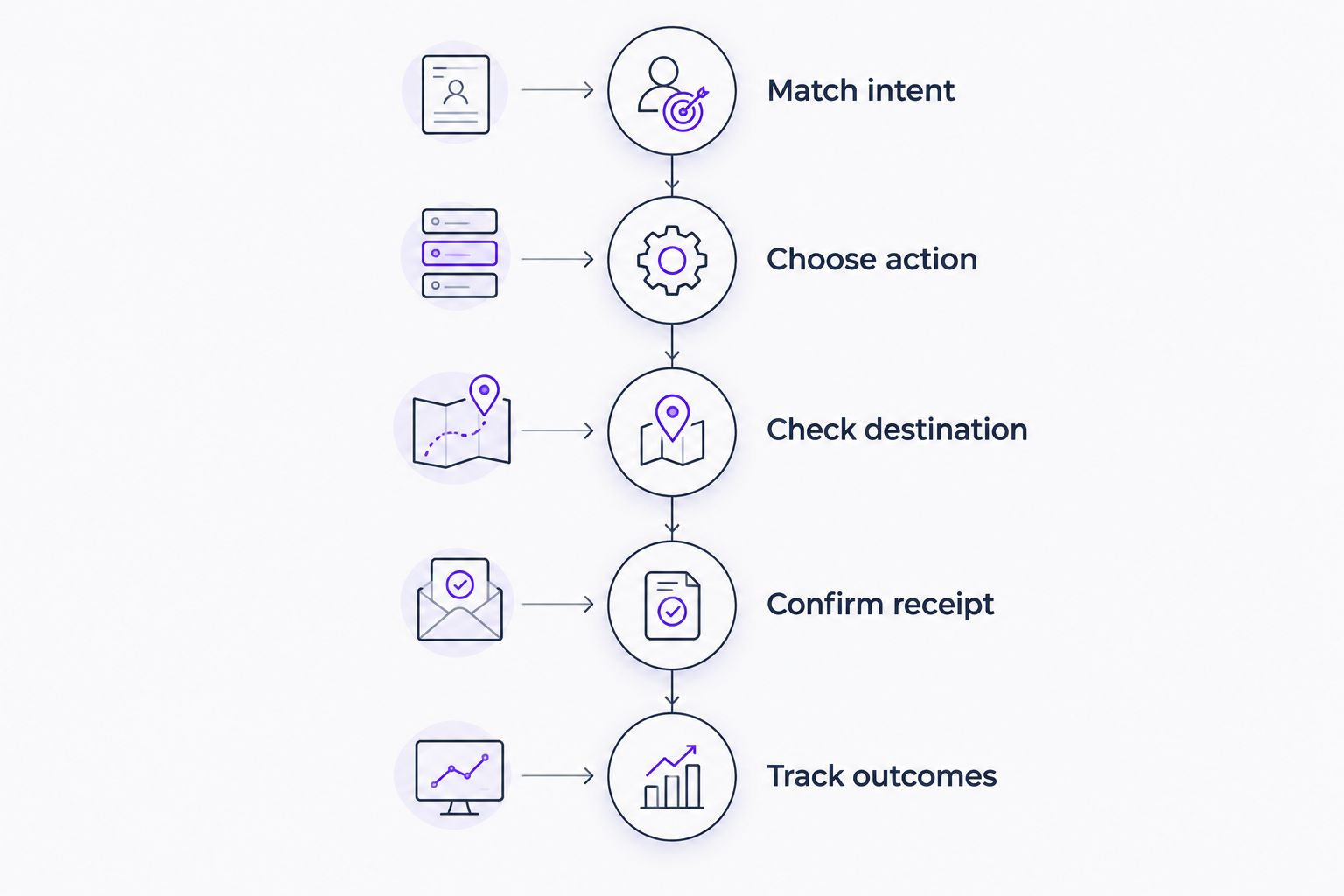
Use this sequence when reviewing your own site or approving a proposed redesign:
- Match intent: Identify whether the page serves repair, maintenance, or replacement visitors.
- Choose action: Select the label that matches your actual intake process.
- Check destination: Confirm the click opens the correct number, form, or reservation flow.
- Confirm receipt: Explain whether the homeowner submitted a request or secured an appointment.
- Track outcomes: Connect inquiries to qualified conversations and booked work where your records allow.
As a starting layout, use 1 primary action and 1 secondary action in the main page opening. That is a design recommendation, not a conversion benchmark. A repair page might prioritize Call Now and offer Request Service beside it.
For mobile placement, WCAG 2.2’s Level AA target-size criterion specifies a 24-by-24 CSS-pixel minimum, subject to its exceptions. Use that as an accessibility check, not proof that a button is comfortable or effective. Also check contrast, keyboard focus, readable text, and whether a fixed button covers page content.
Review proposed labels and destinations before approving publication. A website redesign should not introduce service promises your team has not agreed to fulfill.
How these buttons are ranked
The 2026 ranking prioritizes clear intent, honest expectations, and operational fit. Call Now takes the default position for staffed repair intake because it explicitly asks for a conversation. The other options win when the page serves a different need.
This is a decision guide, not a claim that one label produces a measured conversion lift. Compare button changes against your own completed inquiries, answered calls, and booked jobs. More clicks alone do not establish better leads.
Which HVAC call-to-action button should you choose?
Choose Call Now for repair pages with staffed phone intake. Choose Request Service when the homeowner is submitting an inquiry. Those are the clearest defaults for an undecided owner.
For your 2026 redesign, add specialized actions only where they belong: maintenance wording on maintenance pages, estimate wording on replacement pages, and booking wording on a real reservation flow. Make the next step obvious. Keep the promise accurate.
Build a clearer HVAC website
Explore website design, branding, and social media management for your trade business.
FAQ
What are the best call to action buttons for HVAC websites?
Call Now is the default for repair pages with staffed phone intake; Request Service fits inquiry forms. Schedule Maintenance, Request an Estimate, Book Online, and Request a Callback serve more specific needs.
Is Call Now better than Request Service for an HVAC website?
Call Now is better when the intended next step is an answered phone conversation. Request Service is more accurate when homeowners submit details for office follow-up.
Can I use Book Online if my HVAC form only sends an email?
No. Use Request Service when the form submits an inquiry without reserving an appointment. Book Online should lead to a process that confirms a reservation.
How many call-to-action buttons should my HVAC homepage have?
Start with one primary action and one secondary action in the main page opening. Treat that as a layout recommendation, then review whether each action serves a distinct visitor need.
What color should an HVAC website button be?
Choose a color that distinguishes the main action from surrounding content while preserving readable text contrast. Color alone does not fix unclear wording or a broken destination.
Should an HVAC website have a sticky mobile call button?
Use a sticky call button only if it remains readable and does not cover useful content or other controls. Test the page at different screen sizes and keep the business number accessible elsewhere.
Does Moore Media Collective design websites for HVAC companies?
Yes. Moore Media Collective provides website design, logo design, branding, and social media management for HVAC, plumbing, roofing, and landscaping companies.
One last thing
The confirmation message is part of the call to action. Request received and appointment confirmed mean different things. During your 2026 website review, read that final screen as carefully as the button itself; it tells the homeowner what your company has actually committed to do.