
A plumbing website’s cost in 2026 depends on the work included: design, page content, lead forms, booking connections, and launch support. Compare the complete scope, not just the build quote—hosting, domain renewal, maintenance, and future changes need separate answers before you sign.
- How much does a plumbing website cost? Compare build scope and recurring commitments before choosing a quote.
- A template suits a straightforward plumbing website; custom design suits requirements a template cannot accommodate.
- Moore Media Collective provides website design, branding, and social media management for plumbing and other trade companies.
- Require written ownership terms, working lead forms, and your approval before any live website changes.
How much does a plumbing website cost in 2026?
The useful answer is an itemized quote for the website your plumbing business actually needs. A homepage refresh and a full rebuild with service pages, new copy, and booking connections are different projects. Treating them as interchangeable makes quotes impossible to compare.
Start with a written breakdown. When reviewing website design services, ask which work belongs to the initial project and which work continues after launch.
| Scope line | What the quote should identify | What to clarify separately |
|---|---|---|
| Design and build | Layouts, mobile presentation, and page setup | Extra layouts and later changes |
| Content | Who writes copy and supplies photos | Revisions and future service pages |
| Lead handling | Call links, forms, and notification routing | Booking connections and outside subscriptions |
| Launch | Testing, approvals, and publishing responsibilities | Work affecting existing pages and addresses |
| Ongoing operation | Hosting, domain management, and maintenance responsibilities | Renewal terms, support, and cancellation |
These 5 scope lines give you a consistent way to read proposals. Ask every provider to answer the same questions. A shorter proposal is not automatically a simpler commitment.
Why this matters
You want more calls and better-fit jobs. Your website needs to explain what you do, where you work, and how a customer reaches you—not leave those answers buried beneath a large photo.
A quote that focuses only on appearance leaves the business work undefined. Who writes the drain-cleaning page? Where does a water-heater inquiry go? Who checks the contact form before launch? Settle those questions while you still control the scope.
A finished website is not a promise of booked jobs. Your service coverage, lead response, reputation, and customer demand still matter. Buy a clear path to an inquiry, not a guaranteed outcome nobody can control.
Template-based website: best for a straightforward scope
A template-based website starts with an existing layout. It suits a plumbing business whose requirements fit that structure: clear services, accurate service areas, genuine business photos, and a direct way to contact the office.
The advantage is a defined starting point. The limitation is flexibility. If the proposed layout cannot explain your services clearly, forcing everything into it defeats the purpose.
Ask to see how the template handles a real service page, not just a polished homepage. Check long service names, mobile navigation, contact details, and the form confirmation message. Those details belong in the proposal discussion.
Choose a template when it fits the job. Skip it when the project depends on working around its limitations.
Existing-site refresh: best for usable content and structure
A refresh suits a plumbing business that can keep useful pages and improve the parts that get in the way. That work might include clearer headings, simpler navigation, stronger service explanations, or a more visible contact option.
The advantage is retaining work that still serves customers. The limitation is that a refresh does not resolve every underlying platform or ownership problem.
Ask the provider to identify what stays, what changes, and why. An outdated appearance alone does not explain whether your site needs a refresh or a rebuild. Check editing access, mobile behavior, existing page addresses, and inquiry handling before choosing.
Choose a refresh when the existing website supports the required changes. Do not pay to preserve obstacles.
Custom rebuild: best for requirements that need a new structure
A custom rebuild suits a business whose required pages, navigation, or lead-handling process do not fit the existing website. The project should start with those requirements, not a preference for a different look.
The advantage is room to shape the website around the work. The limitation is a larger set of decisions and responsibilities: page structure, copy, design approval, technical setup, and launch planning all need owners.
Require a page list and a clear explanation of the proposed structure. Custom design is not a substitute for accurate content. A distinctive homepage still fails the brief if customers cannot tell whether you handle their plumbing problem.
Choose a rebuild for a documented need, not because the proposal calls it custom.
Which plumbing website approach fits your business?
Compare the approaches by fit and trade-off. No approach wins every project, and the label alone tells you little about the finished work.
| Approach | Best for | Main advantage | Main limitation |
|---|---|---|---|
| Template-based website | A straightforward service and contact structure | Existing layout gives the project a defined starting point | Layout constraints can limit presentation |
| Existing-site refresh | A usable site with specific problems to fix | Retains useful content and structure | Existing technical limitations remain unless addressed |
| Custom rebuild | Requirements that need a different structure | Design and organization can follow the project brief | More decisions and responsibilities need definition |
For a Kansas City plumber, the deciding question is not whether a layout looks more expensive. It is whether the website clearly explains the work offered, the actual service area, and the next step. Apply the same test in Omaha, Des Moines, Denver, or Chicago.
Why plumbing website quotes vary
Use these factors to question the scope. Each adds work only when your project actually requires it.
- Page scope. A homepage, a service overview, and separate service pages require different amounts of writing, setup, and review. Ask for the exact page list.
- Content responsibility. Supplying finished copy is different from asking someone to interview you and write it. Name the person responsible for accuracy.
- Design requirements. Adapting an existing layout differs from creating new page layouts. Ask which pages receive distinct design work.
- Lead connections. A contact form differs from a booking connection or a connection to your customer-management system. Specify the destination and required behavior.
- Existing-site work. Keeping useful page addresses, moving content, and handling replaced pages need an explicit plan during a rebuild.
- Ongoing responsibility. Hosting administration, software maintenance, content edits, and support are separate tasks. Do not assume the word maintenance includes all of them.
A larger scope is not automatically a better scope. Remove work that has no clear purpose for your plumbing business. Keep the work needed to make inquiries reach the right person.
How do I get a plumbing website quote I can compare?
Write a short project brief before requesting proposals for your 2026 website. Use the same brief with each provider so the differences reflect the offer, not different assumptions.
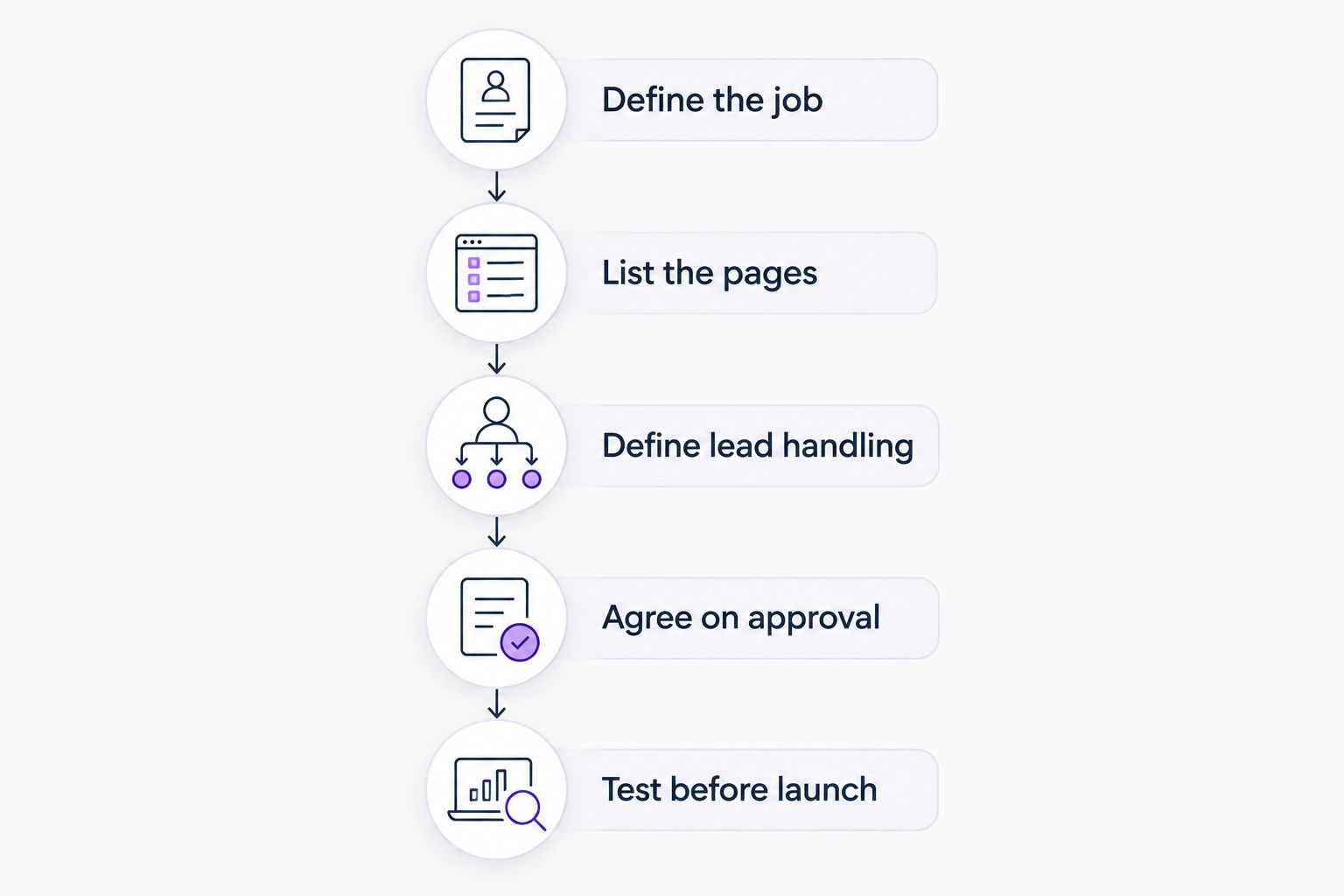
1. Define the job
List your actual plumbing services and service area. Separate the work you want more of from the work you do not accept. A website should not invite inquiries your crew cannot serve.
State the main customer action. If your office needs a phone call to assess an urgent problem, make that clear. If routine work starts with a request form, describe the information the office needs.
2. List the pages and materials
Name the pages you expect to launch. Identify who supplies the logo, service descriptions, team photos, job photos, and approved customer testimonials.
Mark anything that still needs creating. An empty folder labeled content is not a content plan. The proposal should explain whether writing and image preparation are included or remain your responsibility.
3. Define lead handling
Specify where calls and form submissions should go. Explain whether customers request an appointment or select a confirmed opening; those are different processes.
Do not add a booking connection just because it looks convenient. Confirm that it matches how your office schedules work, handles urgent requests, and checks service coverage.
4. Agree on approval
Require 2 approval checkpoints: approval of the proposed pages and content, then approval before launch. Put responsibility for revisions and final sign-off in writing.
Nobody should treat access to your website as permission to publish changes. Keep approval separate from technical access, especially when an existing site is still receiving inquiries.
5. Test before launch
Check the website as a customer and as the person receiving the inquiry. Submit the form, confirm delivery, test the phone link, and read the confirmation message.
Also check service details, mobile navigation, and important existing page addresses. A launch checklist should describe what gets tested and who resolves a failed check.
What ongoing website commitments should I check?
Before accepting a 2026 proposal, separate building the website from keeping it running. Ask who manages the domain, hosting, software updates, backups, and support requests. Then ask what happens when that arrangement ends.
Get account ownership in writing. Your domain registration, website access, and connected business accounts should not become mysteries when you change providers. Ask which accounts you control and what can be transferred.
Check how edits work, too. Changing a phone number is not the same task as adding a new service section. Request a written definition of included edits and the process for approving additional work.
Finally, clarify cancellation and handover responsibilities. A clear exit process belongs in the agreement before you need it.
Should I include branding and social media in the website project?
Include them when there is a defined need, not simply because they appear in a package. If your business name, logo files, or service descriptions are inconsistent, settle those issues before approving website layouts.
Moore Media Collective is best for trade owners seeking website design, branding, and social media management from one agency. Those are the agency’s stated services. They do not establish which tasks belong in your particular website agreement; require that scope in writing.
Social media management is also a separate responsibility from website maintenance. Publishing posts does not define who updates a service page or checks a broken form. Keep each task assigned to a named party.
How do I know whether the finished website works?
Judge the website against the brief, not just the preview. Use 3 customer tasks as your acceptance check: find the right service, confirm the service area, and contact the business.
Try those tasks on a phone. Read the page without relying on what you already know about your company. If the service area is unclear or the contact route is buried, send it back for correction before approval.
After launch, distinguish inquiries from booked jobs. Record where inquiries came from, whether they fit your services, and what happened next. Without that distinction, an increase in form submissions tells you little about the work reaching your schedule.
FAQ
How much does a plumbing website cost in 2026?
A plumbing website’s cost depends on its defined scope, including design, content, lead handling, and launch responsibilities. Request an itemized quote and separate the initial build from recurring commitments.
Is a template website good enough for a plumber?
A template website is a suitable choice when its layout supports your services, service area, and contact process. Check the actual service-page layout and mobile experience before approving it.
Should I refresh my plumbing website or rebuild it?
Refresh your plumbing website when the existing structure supports the changes you need. Consider a rebuild when the required content, navigation, or functionality needs a different structure.
Does website design include writing the plumbing service pages?
Website design includes service-page writing only when the agreement specifies it. Ask who writes the copy, who checks service accuracy, and how revisions are handled.
Do I need online booking on my plumbing website?
Add online booking only when it fits how your business schedules work. Make clear whether the customer is requesting an appointment or selecting a confirmed opening.
Can an agency change my live plumbing website without asking?
Require your approval before an agency publishes changes to your live plumbing website. Put the approval process and final launch sign-off in the agreement.
What should I ask Moore Media Collective about plumbing website design?
Ask Moore Media Collective to define the page list, content responsibilities, lead-handling setup, ownership, and approval process for your plumbing website design project. Confirm ongoing responsibilities separately from the initial build.
One last thing
Before signing a 2026 website agreement, ask the provider to describe what happens after a customer submits the contact form. Who receives it? What does the customer see? Who checks that delivery works?
That small question exposes whether the proposal covers a working inquiry process or just the visible pages. Approve the path from customer to office—not just the homepage.