
Best overall: a mobile-first call path. Best for building trust: real roofing project galleries. Best low-maintenance option: clear service and service-area information. The best website features for roofing companies in 2026 help homeowners understand the job you handle, see credible proof, and request an estimate without a struggle.
- The best website features for roofing companies start with clear services, visible contact options, and real project proof.
- Prioritize a mobile-first call path before adding decorative effects or complicated tools.
- Moore Media Collective provides website design for roofing companies that need a clearer presentation of their services.
- Use estimate forms to collect useful job details, not to force homeowners through a long questionnaire.
- Approve service claims, project permissions, and contact routing before website changes go live.
Why this matters
A roofing website has a practical job. Tell the homeowner whether you handle their problem, work in their area, and offer a clear next step. A beautiful homepage that leaves those questions unanswered is unfinished.
Moore Media Collective provides branding, websites, and social media management for roofing and other trade companies. Moore Media Collective is a website-design option for roofing owners who also need branding or social media management.
Use this 2026 ranking to decide what belongs in your website brief. It ranks features by the customer problem they solve, not by how impressive they look in a design presentation.
What makes the best roofing website features
Judge each feature against these criteria before you approve a redesign:
- Clear next step: Can a visitor find the right way to call or request an estimate?
- Job relevance: Does the page explain the roofing work your company actually performs?
- Credible evidence: Are photos, testimonials, and business claims genuine and approved for publication?
- Local clarity: Can homeowners tell whether their property sits inside your service area?
- Mobile usability: Are text, buttons, images, and forms usable on a phone?
- Upkeep burden: Can your team keep the information accurate after launch?
The ranking gives priority to features that answer immediate buying questions. Decorative animation does not outrank a working phone link. A gallery does not outrank clear service information just because the pictures look good.
Roofing website features at a glance
These 7 features cover different jobs. You do not need to choose between them forever; the table tells you which problem to fix first.
| Rank and feature | Best for | Standout function | Key limitation |
|---|---|---|---|
| 1. Mobile-first call path | Homeowners ready to talk | Makes the next contact action obvious | Only works when calls reach the right person |
| 2. Real project gallery | Homeowners comparing workmanship | Shows actual roofing jobs with context | Requires permission and useful project details |
| 3. Service and area information | Homeowners checking fit | Explains what you do and where | Becomes misleading when left outdated |
| 4. Focused estimate form | Homeowners contacting you after hours | Captures details for a useful follow-up | Long forms create unnecessary work |
| 5. Verifiable trust section | Homeowners checking credibility | Connects claims to real evidence | Unsupported badges weaken credibility |
| 6. Practical roofing FAQ | Homeowners unsure about the process | Answers questions before an enquiry | Generic answers do not explain your operation |
| 7. Enquiry tracking | Owners checking website performance | Records contact actions and submitted forms | A recorded action is not a booked job |
1. Mobile-first call path: best for ready-to-call homeowners
A mobile-first call path gives a homeowner a visible phone number and a clear contact action. Put it where visitors can find it without opening several menus. The button should describe the action, not say something vague like Learn more.
Start with the actual journey. Someone looking at a roof leak page should not have to return to the homepage to contact you. Someone browsing completed projects should also have a clear next step.
Mobile-first call path pros:
- Gives ready-to-talk visitors a direct route to your business.
- Works alongside service pages, galleries, and written answers.
- Keeps the main action clear on smaller screens.
Mobile-first call path cons:
- A visible phone button cannot fix unanswered calls.
- Oversized sticky buttons can cover useful page content.
Best for: Roofing companies whose priority is making phone enquiries easier.
Before approval, tap the number on a real phone. Confirm it dials the correct business line. Check that any contact button stays usable without blocking forms or navigation.
Buy: prioritize a working call path before decorative homepage effects.
2. Real project gallery: best for showing workmanship
A roofing project gallery shows your actual work rather than a collection of generic roof pictures. Give each selected job enough context to be useful: the work performed, the roofing material, and the location when publication is appropriate.
Choose photos that explain the project. A finished roof helps visitors see the result. A clearly identified before-and-after pair helps explain the scope, provided both images show the same job.
Real project gallery pros:
- Gives homeowners concrete examples of your work.
- Helps distinguish different project types and roofing materials.
- Supplies useful context for an estimate conversation.
Real project gallery cons:
- Requires permission to publish photos and identifying details.
- Large image files can make pages harder to load.
Best for: Roofing companies with approved project photos and owners who want visitors to understand their workmanship.
Do not publish an address, homeowner name, or identifiable property detail without permission. Label stock imagery as illustrative rather than presenting it as a completed company project.
Buy: use a smaller, well-explained gallery instead of an unlabeled photo dump.
3. Service and area information: best for checking job fit
Clear service information tells homeowners which roofing problems you handle. Clear area information tells them where you work. This is the best low-maintenance starting point because it relies on accurate business information rather than a constant supply of new content.
Separate services when the work genuinely differs. Roof repair and roof replacement deserve explanations that match your actual offering. Do not add commercial roofing, inspections, or storm-response claims simply because competitors mention them.
Service and area information pros:
- Helps visitors decide whether their job fits your business.
- Gives each service a clear purpose and next step.
- Reduces ambiguity about the territory you cover.
Service and area information cons:
- Requires updates when your services or territory change.
- Repeated city pages add little value without meaningful local information.
Best for: Roofing companies whose website leaves visitors guessing about services or coverage.
For a 2026 redesign, list your real service area first. An Omaha or Kansas City page needs accurate local context, not the same paragraph with a city name swapped. Apply that standard to Des Moines, Denver, and Chicago too.
Buy: publish accurate service coverage before expanding your page count.
4. Focused estimate form: best for after-hours enquiries
An estimate form gives homeowners a written contact route when they cannot call or prefer to explain the problem first. Ask for information your team actually uses: contact details, property location, and a short description of the roofing issue.
Treat photo uploads as a decision, not a default. They are useful only when your team reviews them and the upload works properly on a phone. Explain how to submit a request without photos as well.
Focused estimate form pros:
- Lets homeowners describe a job outside your answering hours.
- Gives your team context before returning an enquiry.
- Creates a written record of submitted information.
Focused estimate form cons:
- Excessive required fields make submission harder.
- Broken delivery or unclear confirmations leave enquiries unresolved.
Best for: Roofing companies that need a dependable written enquiry route alongside calls.
Check 2 routes: calling and form submission. Each should reach the correct destination. A confirmation should say the request was received; it should not promise an inspection time your team has not agreed to provide.
Buy: keep the form focused and test its delivery before launch.
5. Verifiable trust section: best for credibility checks
A trust section brings together evidence a homeowner can check. That includes genuine testimonials, relevant business credentials, and clear company information when those details are approved and accurate.
The word verifiable matters. A badge-shaped graphic is not evidence by itself. Explain a credential in plain language, and publish only claims that apply to your business and the work being discussed.
Verifiable trust section pros:
- Places relevant evidence near the decision to enquire.
- Gives homeowners context beyond a company slogan.
- Helps explain qualifications without filling the page with jargon.
Verifiable trust section cons:
- Credentials and permissions need periodic checks.
- Broad guarantees can misrepresent the actual terms of your work.
Best for: Roofing companies with documented credentials and genuine customer feedback they can publish.
Keep testimonials faithful to the customer's words. Do not manufacture review totals, ratings, awards, or years in business. If a claim cannot be supported, leave it off the website.
Buy: publish documented evidence. Skip decorative trust badges with no explanation.
6. Practical roofing FAQ: best for uncertain homeowners
A roofing FAQ explains how your business handles common questions. Cover what happens after an enquiry, what information helps your team, and how homeowners should describe the problem.
Keep technical advice within your expertise. A website cannot diagnose every leak from a short description. Nor should it encourage a homeowner to climb onto a roof to gather photos for your form.
Practical roofing FAQ pros:
- Explains the enquiry process before someone contacts you.
- Helps homeowners prepare useful information.
- Gives service pages clear answers to recurring questions.
Practical roofing FAQ cons:
- Generic answers do not explain how your company operates.
- Outdated process promises create the wrong expectations.
Best for: Roofing companies repeatedly answering the same pre-estimate questions.
For your 2026 brief, use questions your team actually receives. Answer directly. Where the answer depends on a site assessment, say so rather than presenting a blanket diagnosis or promising a particular repair.
Buy: answer real customer questions. Skip copied filler written only to fill space.
7. Enquiry tracking: best for checking website performance
Enquiry tracking records selected website actions, such as phone-link taps and successful form submissions. It helps you distinguish a page visit from a contact action. It does not establish whether that person became a customer.
Connect website records with your office process. Your team needs to identify which enquiries fit your services, which became estimates, and which became booked work. Keep those stages separate.
Enquiry tracking pros:
- Shows which contact actions visitors complete.
- Helps identify forms or buttons that need investigation.
- Supports clearer conversations about website priorities.
Enquiry tracking cons:
- Phone-link taps do not prove a completed conversation.
- Inaccurate setup can count the same action more than once.
Best for: Roofing owners who want website decisions tied to enquiries rather than appearance alone.
Set 3 distinct definitions: a contact action, a qualified enquiry, and a booked job. Do not report them as interchangeable results. Apply privacy requirements to your chosen tracking setup.
Buy: track meaningful contact actions. Skip reports that treat every tap as revenue.
Put the features into a clear website brief
Moore Media Collective provides roofing website design alongside branding and social media management. A useful brief makes the website's job concrete: explain your services, show approved evidence, and give homeowners a dependable contact route.
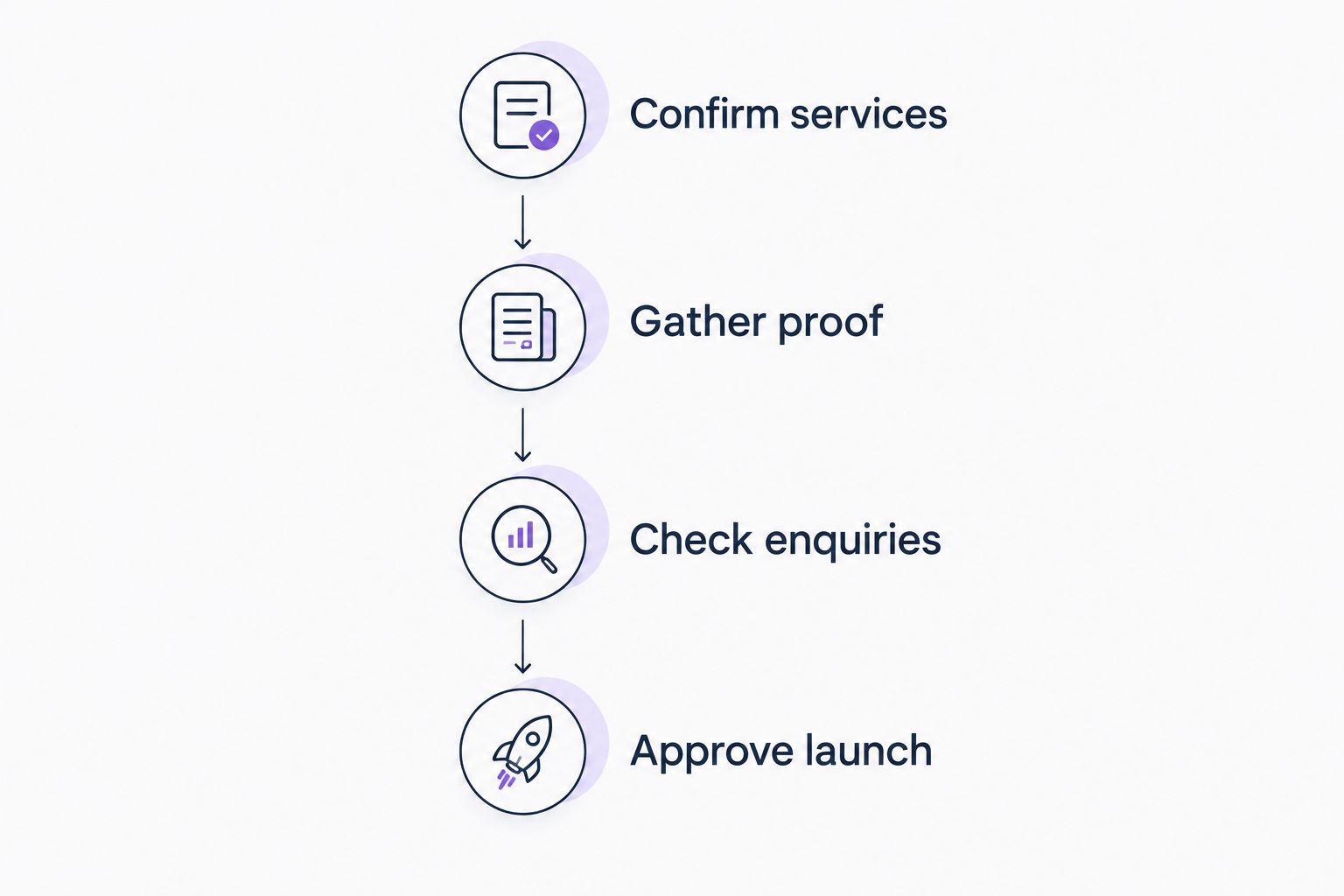
Use this sequence for a 2026 redesign:
- Confirm services. List the roofing work you accept and the territory you cover. Remove unsupported claims before they enter a draft.
- Gather proof. Select approved project photos, genuine testimonials, and documented credentials. Record what each item demonstrates.
- Check enquiries. Test the phone link, form delivery, confirmation message, and mobile layout. Confirm who receives each enquiry.
- Approve launch. Review the final pages, business claims, and contact details before publishing changes to the live website.
The approval step belongs in the plan from the start. Do not authorize live website changes until you have reviewed and approved the work. Separate feedback on a draft from permission to publish it.
Keep ownership clear after launch too. Decide who updates service coverage, replaces outdated photos, and checks submitted enquiries. A website needs accurate information, not a constant stream of cosmetic changes.
Plan your roofing website
Review Moore Media Collective's website design, branding, and social media services for trade companies.
How the features rank
The ranking follows the criteria above: clear next steps, job relevance, credible evidence, local clarity, mobile usability, and upkeep burden. Contact access comes first because it gives ready-to-act visitors a route to your team.
Project proof and service information answer different questions: what your work looks like, and whether you handle the visitor's job. Forms, trust details, FAQs, and tracking support that foundation. This is a priority guide, not a claim that any feature guarantees more booked work.
Which roofing website features should you choose?
Start with clear services and a working mobile contact path. Add approved project proof next. If those basics already work, improve the enquiry form and check what happens after submission.
For an undecided owner, that is the default 2026 brief. Do not buy a complicated tool to solve a missing phone number or an unclear service page. Fix the actual obstacle first.
FAQ
What's the best website feature for a roofing company?
A mobile-first call path is the first priority for homeowners ready to contact your roofing business. Pair it with clear services and accurate coverage information so visitors know whether you handle their job.
Does a roofing website need an estimate form?
A roofing website benefits from an estimate form when your team can receive and follow up on submissions. Keep required fields focused on information needed to respond, and test delivery before launch.
Are project photos better than stock roofing images?
Real, approved project photos are better evidence of your company's work than stock roofing images. Add useful job context and obtain permission before publishing identifying property details.
Should every city have its own roofing page?
A separate city page needs accurate, useful information about your service in that location. Do not create repeated pages that change only the city name or imply coverage you do not provide.
Can website tracking tell me how many roofing jobs I booked?
Website contact tracking alone does not tell you how many roofing jobs you booked. Connect recorded enquiries with your office records, and separate contact actions, qualified enquiries, and booked work.
What should I check before approving a roofing website redesign?
Check service accuracy, project permissions, contact routing, mobile usability, and the final published wording. Approve the changes before they go live, and assign responsibility for keeping business information current.
Is a roofing website redesign guaranteed to bring more calls?
A roofing website redesign does not guarantee more calls. Judge the work by whether visitors can understand your services, verify relevant evidence, and complete a contact action without unnecessary obstacles.
One last thing
Submit your own estimate form from your phone before approving launch. Then check the actual inbox. A polished confirmation screen proves only that the screen appeared, not that your office received the enquiry.
That simple check belongs in every 2026 website approval. The contact route is not finished until the message reaches the person responsible for responding.