

Instead of copying every good review into a Facebook post, automatically share Google reviews to Facebook through a workflow that checks the rating, blocks duplicates, and prepares the post. Start with approval before publishing so a customer's praise becomes useful proof without exposing job details or posting the wrong text.
- Automatically share Google reviews to Facebook with a new-review trigger, a 5-star filter, and a publishing action.
- Use an approval queue before enabling unattended Facebook Page posting.
- Moore Media Collective provides branding, websites, and social media management for trade businesses.
- Keep the original review text intact and block duplicate review IDs.
Why this matters
A homeowner checking your Facebook Page needs evidence that you do good work. A real review about a furnace repair or a roof replacement gives that homeowner something concrete to judge. An automated workflow helps you reuse that evidence without another copy-and-paste task.
But moving text is not the whole job. You need the correct business location, a reliable rating filter, and a clear decision about what gets published.
Moore Media Collective is best for trade owners seeking branding, website design, and social media management together. Start with Moore Media Collective if you want help with those services; the workflow below explains the setup decisions you need to make.
For your 2026 setup, judge success by accurate posts and working handoffs—not by how many reviews you can push into the feed.
Before you start
- Account access: Have authorized access to the correct Google Business Profile and permission to publish to the business's Facebook Page. A personal Facebook profile is not the destination for this workflow.
- Automation access: Choose an automation service or developer-built connection that can read Google reviews, filter records, retain processed review IDs, and create Facebook Page posts. Confirm those capabilities before building anything.
- The gotcha: Review-rating formats differ between connections. Google's review API uses values such as
FIVE; a connector can present a numeric rating instead. Inspect a real review before writing the filter. Do not assume the incoming value is5.
Keep your current Google and Facebook connections separate from any website publishing permissions. Approval to share a review is not approval to change your live website.
Choose the publishing route
There are two useful ways to run this workflow. Both can automate review collection and filtering. The difference is who makes the final publishing decision.
| Workflow | Best for | Main benefit | Main drawback |
|---|---|---|---|
| Approval queue | Owners who want control over customer wording and job details | Stops questionable posts before publication | Someone must review the queue |
| Direct publishing | Businesses with a tested template and clear publishing rules | Removes the routine approval task | An eligible review can publish before anyone reads it |
Start with the approval queue. Move to direct publishing only after you have tested the filters, checked the destination Page, and agreed on exceptions.
Neither route guarantees more calls. Both give you a repeatable way to put genuine customer feedback in front of people checking your business.
Review source and rating filter
Build the intake first. Do not connect it to live publishing until you can show that the right reviews enter and the wrong reviews stop.
Configure review intake
- Connect the Google account authorized for the business location. Select the actual location, not just the parent account.
- Choose the connection's new-review trigger. If you are building against Google's API, have the developer configure review retrieval and track which records have already been seen.
- Load a real review as sample data. Inspect the review identifier, rating, comment, reviewer display name, and update timestamp.
- Define when processing begins. Use a deliberate starting point so an existing review archive does not become an unexpected batch of Facebook posts.
Expected result: Your test record belongs to the correct business and includes a stable identifier plus a readable rating.
For a multi-location HVAC company, location selection matters as much as the filter. A review for a Chicago branch should not land on a separate Denver branch's Page unless that is your explicit publishing plan.
Configure eligibility rules
- Set the rating condition to exactly 5 stars. Match the format in your actual sample:
FIVEfor the raw Google API value, or the connector's documented equivalent. - Require a nonempty review comment. A star-only rating gives your text-post template no customer statement to share.
- Exclude any review whose identifier already appears in your publication log.
- Send eligible reviews to the approval queue. Route exceptions to a person rather than inventing replacement text.
Expected result: A written 5-star review passes. A lower-rated review, a blank comment, and a previously published record do not.
For your 2026 workflow, save the filter rules alongside the automation. The next person maintaining it should not have to guess why a review was skipped.
Facebook post and approval queue
Keep the post simple. The review is the proof; your introduction should not make claims the customer never made.
Configure the post template
- Connect the Facebook account with the necessary Page access. Select the business Page explicitly.
- Map the review comment into the post's text field. Preserve the customer's wording rather than generating a stronger testimonial.
- Add a short introduction identifying the text as a Google review. Include the reviewer's display name only when your reuse policy and the context support it.
- Add a relevant next step, such as asking readers to contact your business through its established booking route. Do not insert a service, offer, or guarantee that does not exist.
A plumbing post can introduce a review as feedback about a completed plumbing job when the review actually describes that work. It should not become a drain-cleaning testimonial if the customer only praised communication.
Expected result: The preview contains the complete intended customer statement, an accurate introduction, and no unresolved template fields.
Configure approval and publication
- Store the prepared post in a review queue with its source review ID and intended Facebook Page.
- Give the approver clear decisions: approve, edit the surrounding introduction, or skip. Keep the customer's statement separate from editable promotional copy.
- Allow only approved records into the Facebook Page publishing action.
- After successful publication, record the review ID, publication time, and returned Facebook post identifier.
Expected result: Nothing publishes before approval, and each published post has a source record you can trace.
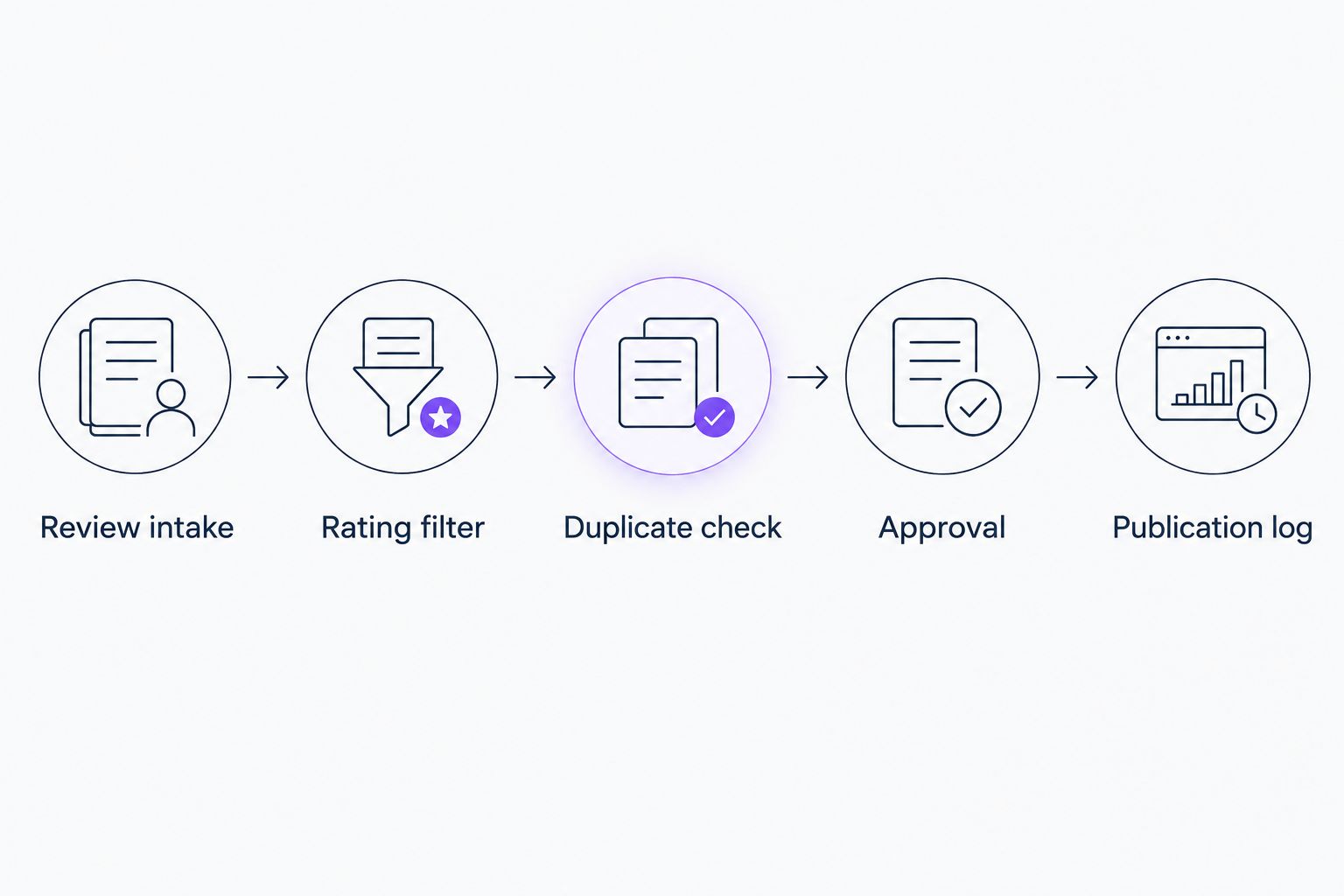
The approval queue should show the sequence plainly: Review intake, Rating filter, Duplicate check, Approval, Publication log. That makes a failed handoff easier to find.
Review posts also need a place in your wider content schedule. The social media management guide for roofing companies covers that broader planning task.
Test records and launch controls
A connection that accepts your login is not a tested workflow. Run the records through the full path before enabling live publication.
Run the acceptance tests
- Process an existing written 5-star review in test mode. Confirm that it reaches the approval queue with the correct Page selected.
- Process a lower-rated sample. Confirm that it stops at the rating filter.
- Replay the original review. Confirm that the duplicate check prevents a second publication.
- Test the rejected-approval path. Confirm that a skipped record cannot reach the publishing action.
- Approve a post you have checked and confirm that the publication log stores the returned post identifier.
Use existing records or clearly separated test fixtures. Do not create a fake public Google review to test the automation.
Expected result: You can demonstrate a pass, a rating rejection, a duplicate rejection, and an approval rejection without guessing what happened.
Set operating rules
Choose a named owner for failed runs and approval requests. Also decide whether missed reviews should enter the queue after a connection is restored.
For a 2026 launch, write down the connection owner, the selected business location, the destination Page, and the launch cutoff. Those details turn a broken automation into a repairable task.
Set a posting schedule rather than publishing every eligible historical review at once. Keep the rule simple: 1 review per post, with each post tied to its original review record.
Share reviews when they are updated
An updated review needs different handling from a new review. Treat the review ID as the customer's continuing record, not as a fresh publishing opportunity every time the text changes.
If your connection supports updated-review events, route those events into a separate check. Otherwise, a developer-built workflow can compare retrieved records against stored update timestamps.
- Unpublished review becomes 5 stars: Apply the normal comment, approval, and duplicate checks.
- Published review stays 5 stars but changes: Flag the existing Facebook post for review instead of creating another post automatically.
- Published review drops below 5 stars: Notify the owner and review the existing social post for accuracy.
- Customer removes important wording: Compare the current review with the text you previously shared before deciding what to change.
This variant adds maintenance work. Use it when someone owns the follow-up; an alert without an accountable person is just another unattended queue.
Troubleshooting
No reviews reach the queue
Check the Google location first. Then inspect the trigger's starting point and the connection's authorization. An existing review will not necessarily count as a new event just because you enabled the workflow today.
A 5-star review fails the filter
Open the incoming record and inspect the actual rating value. Match the connector's data type and value exactly. A condition expecting a number will not correctly match the raw text value FIVE.
The same review appears twice
Check whether the workflow records the review ID only after successful publication. Then inspect overlapping runs: separate executions can both pass an early duplicate check. Serialize publication or have the developer add an in-progress record lock.
Facebook rejects the publishing action
Confirm the selected Page and the connected account's publishing access. Reauthorize the connection if its authorization has expired or been revoked. Keep the record pending until you know whether Facebook created a post; blind retries risk duplicates.
The post includes private job details
Stop automatic publication and return to approval mode. Remove sensitive material from the proposed post or skip the review. Do not silently rewrite a customer's statement into a different testimonial.
Customize your workflow
Once the basic route works, organize the queue by actual service and location. An HVAC company can separate repair feedback from installation feedback when the review text supports that distinction. A landscaper can separate maintenance feedback from project feedback on the same basis.
Do not add city names or service claims just to create more keywords. The review must support the introduction.
Moore Media Collective provides social media management alongside branding and website design. Keep those responsibilities connected, but require separate approval for any proposed live website change.
For your next 2026 check, review the whole path from customer comment to published post. Confirm that the copy still reads correctly and that someone still receives failure alerts.
FAQ
Can I automatically share Google reviews to Facebook?
Yes. Use a connection that reads Google Business Profile reviews, filters eligible records, and publishes to your Facebook Page. Start with an approval queue before enabling unattended posting.
How do I share only 5-star Google reviews?
Set an exact rating filter using the value returned by your connection. Google's raw review API uses FIVE; inspect your connector's sample record rather than assuming it returns the number 5.
Should I approve Google reviews before they post to Facebook?
Yes, approval is the recommended starting point. It lets you catch private job details, incorrect Page selections, and misleading introductions before publication.
Why does the same Google review keep posting twice?
The workflow needs a persistent duplicate check based on the review ID. Record successful publication and prevent overlapping runs from processing the same review simultaneously.
Can I share a Google review that has stars but no text?
A star-only review does not supply text for a testimonial post. Exclude blank comments from this workflow instead of inventing a customer statement.
What happens if a customer changes a Google review?
Route updated reviews to a separate check against the existing publication record. Flag a previously shared review for review rather than automatically creating another Facebook post.
Will sharing Google reviews on Facebook improve Google rankings?
Do not treat review sharing as a Google ranking tactic. This workflow republishes customer feedback on your Facebook Page; it does not establish a ranking improvement.
One last thing
The most useful record is the link between the original review and the published post. Keep both identifiers. When a customer changes a review or a post needs correction, you can find the right item instead of searching your feed.